User Guide
HireLah is a desktop app that helps recruiters to manage talent and job candidates by tracking every step of the hiring process, from offering positions to scheduling interviews with candidates. It is optimised for Command Line Interface (CLI) users while still offering a GUI, so that power users can accomplish tasks much quicker by using commands
- Quick start
- Features
- Add
- Edit
- Delete
- List
- Passing Interviews :
pass - Failing Interviews :
fail - Accepting Interviews :
accept - Rejecting Interviews :
reject - Exporting Data :
export - Clearing Data :
clear - Viewing Help :
help - Exiting the program :
exit - Saving the data
- FAQ
Quick start
-
Ensure you have Java
11or above installed in your Computer. -
Download the latest
HireLah.jarfrom here. -
Copy the file to the folder you want to use as the home folder for your HireLah.
-
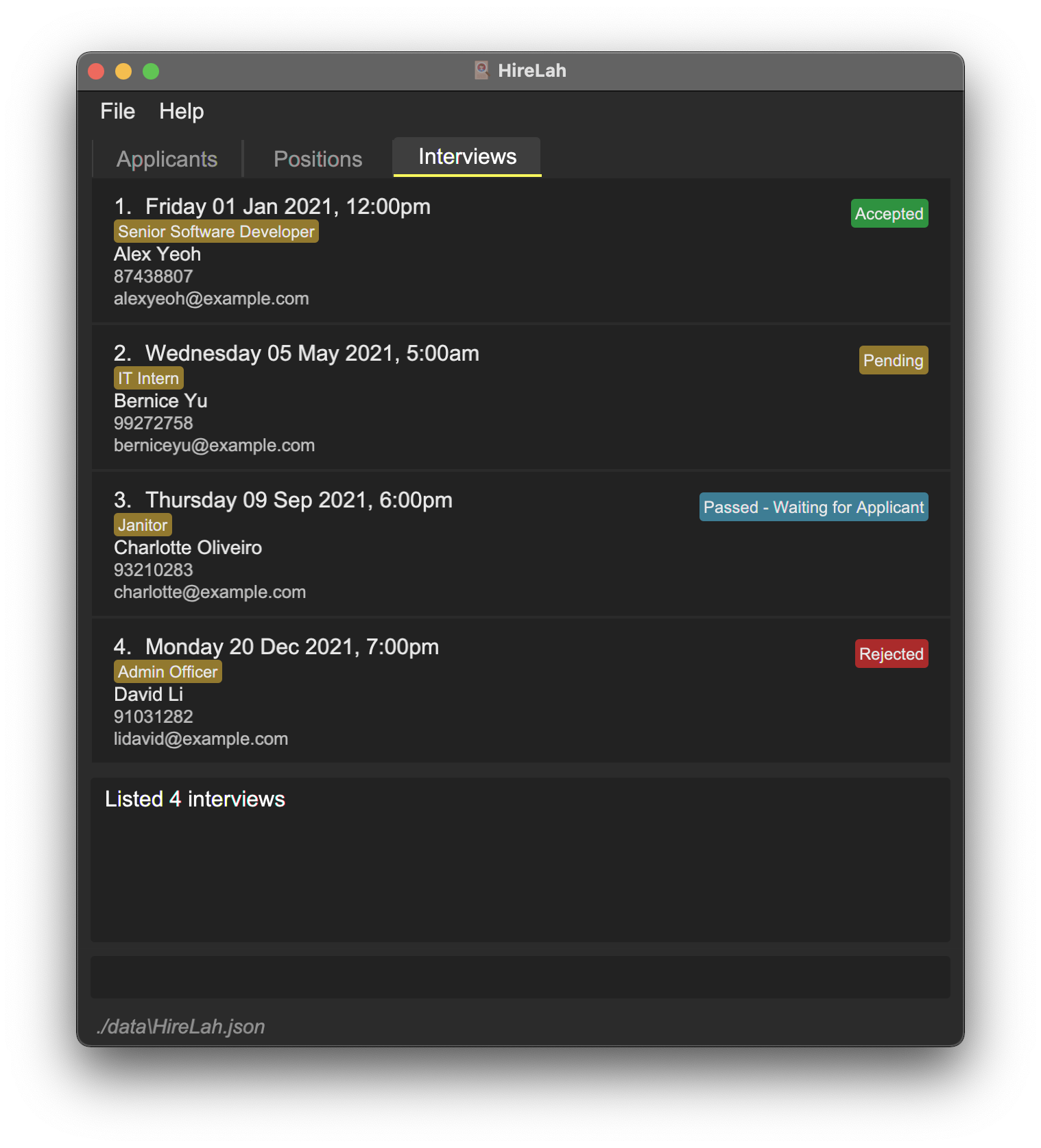
Double-click the file to start the app. The GUI similar to the below should appear in a few seconds. Note how the app contains some sample data.
-
Type the command in the command box and press Enter to execute it. e.g. typing
helpand pressing Enter will open the help window.
Some example commands you can try:-
list -i: Switches to interview tab and displays all interviews. -
list -a s/asc: Switches to applicants tab and displays all applicants sorted by name in ascending order. -
add -a n/Benedict ag/20 g/M p/98123456 e/ben@gmail.com a/12 Kent Ridge Drive, 119243: Adds an applicant namedBenedictto the HireLah. -
delete -i 2: Deletes the 2nd interview shown in the current interview list. -
export -a: Exports the displayed data of all applicants in HireLah to a CSV file. -
exit: Exits the app.
-
-
Refer to the Features below for details of each command.
Features
 Notes about the command format:
-
Words in
UPPER_CASEare the parameters to be supplied by the user.
e.g. inadd -a n/NAME,NAMEis a parameter which can be used asadd n/Benedict. -
Items in square brackets are optional.
e.gn/NAME [t/TAG]can be used asn/John Doe t/C++or asn/John Doe. -
Items with
… after them can be used multiple times including zero times.
e.g.[t/TAG]…can be used ast/C++,t/Java t/C++etc. -
Parameters can be in any order.
e.g. if the command specifiesn/NAME p/PHONE_NUMBER,p/PHONE_NUMBER n/NAMEis also acceptable. -
If a parameter is expected only once in the command but you specified it multiple times, only the last occurrence of the parameter will be taken.
e.g. if you specifyp/12341234 p/56785678, onlyp/56785678will be taken. -
Extraneous parameters for commands that do not take in parameters (such as
exit) will be ignored.
e.g. if the command specifiesexit 123, it will be interpreted asexit. -
The largest value for a positive integer is 2147483647, which is the maximum value usable for all the index.
Add
General command to add different data types into HireLah.
Format: add -TYPE …
- TYPE must take the form of
a,i,p-
-ato indicate adding an applicant -
-ito indicate adding an interview -
-pto indicate adding a position
-
Adding Applicant: add -a
Adds a new applicant to HireLah
Format: add -a n/APPLICANT_NAME ag/AGE g/GENDER p/PHONE_NUMBER e/EMAIL a/ADDRESS [t/TAG]…
 Tip:
An applicant can have any number of tags (including 0)
Tip:
An applicant can have any number of tags (including 0)
- Age provided must be exactly two digits and should not start with 0 eg: “23”.
- Two applicants cannot have the same Name, Phone Number or Email.
- Gender must be M/F. (case-sensitive)
Examples:
add -a n/Benedict ag/20 g/M p/98123456 e/ben@gmail.com a/12 Kent Ridge Drive, 119243add -a n/Max ag/15 g/M p/97123456 e/max@yahoo.com a/12 Kent Ridge Drive, 119243 t/Data Analyst
Adding Interview : add -i
Adds a new interview to HireLah.
Format: add -i APPLICANT_INDEX d/DATE p/POSITION_INDEX
- Date provided must be in format YYYY-MM-DD HH:MM.
- All interviews added have a duration of 1 hour.
- An applicant can only have interviews if they are at least 1 hour (60 minutes) apart. For example,
an applicant can have an interview at
2022-01-01 13:00and again at2022-01-01 14:00, but not at2022-01-01 13:50. - An applicant can only have at most one interview for each unique position in the position list.
- An interview cannot be created for a Position that has no openings.
- An interview cannot be created for an Applicant that has already been hired.
- The
APPLICANT_INDEXrefers to the index number shown in the last displayed Applicant list. - The
POSITION_INDEXrefers to the index number shown in the last displayed Position list. - Index provided must be a positive integer 1, 2, 3, …
Examples:
add -i 1 d/2022-01-01 14:00 p/2
Adding Positions : add -p
Adds a new open position to HireLah.
Format: add -p p/POSITION_NAME o/NUM_OPENINGS d/DESCRIPTION [r/REQUIREMENTS]
Tip:
A position can have any number of requirements (including 0)
- Positions must have a unique name.
- Name provided is case-insensitive.
- Number of openings in the position must be between 1 and 5 digits.
- Description must be between 1 and 200 characters.
- Name must be between 1 and 100 characters.
Examples:
add -p p/Senior Software Engineer o/3 d/More than 5 years experience r/JavaScript r/HTML r/CSS
Edit
General command to edit different types into HireLah.
Format: edit -TYPE …
- TYPE must take the form of
a,i,p-
-ato indicate editing an applicant -
-ito indicate editing an interview -
-pto indicate editing a position
-
Editing Applicant : edit -a
Edits an existing Applicant in HireLah.
Format: edit -a APPLICANT_INDEX [n/APPLICANT_NAME] [ag/AGE] [g/GENDER] [p/PHONE_NUMBER] [e/EMAIL] [a/ADDRESS] [t/TAG]…
- Edits the Applicant at the specified
APPLICANT_INDEX. - The
APPLICANT_INDEXrefers to the index number shown in the last displayed applicant list. - The
APPLICANT_INDEXmust be a positive integer 1, 2, 3, … - At least one of the optional fields must be provided.
- Existing values will be updated to the input values.
- When editing tags, the existing tags of the applicant will be removed i.e adding of tags is not cumulative.
- You can remove all the Applicant’s tags by typing
t/without specifying any tags after it.
Examples:
edit -a 1 n/Belle ag/43 g/F p/81234567edit -a 2 e/cedric@yahoo.com a/13 Computing Drive 612345 t/
Editing Interview : edit -i
Edits an existing interview in HireLah.
Format: edit -i INTERVIEW_INDEX [a/APPLICANT_INDEX] [d/DATE] [p/POSITION_INDEX]
- Date provided must be in format YYYY-MM-DD HH:MM.
- Edits the interview at the specified
INTERVIEW_INDEX. - Only interviews with
Pendingstatus can be edited. - The
INTERVIEW_INDEXrefers to the index number shown in the last displayed interview list. - The
APPLICANT_INDEXrefers to the index number shown in the last displayed applicant list. - The
POSITION_INDEXrefers to the index number shown in the last displayed position list. - At least one optional field must be provided.
- Existing attribute of the interview will be updated to the input value.
Examples:
edit -i 1 d/2022-01-01 15:00edit -i 3 a/1 d/2022-01-01 15:00 p/1
Editing Positions : edit -p
Edits an existing position in HireLah.
Format: edit -p POSITION_INDEX [p/POSITION_NAME] [o/NUM_OPENINGS] [d/DESCRIPTION] [r/REQUIREMENTS]
- Edits the available position at the specified
POSITION_INDEX. - The
POSITION_INDEXrefers to the index number shown in the last displayed position list. - At least one optional field must be provided.
- Existing attributes of the position will be updated to the input value.
- When editing requirements, the existing requirements of the position will be removed. i.e. adding requirements is not cumulative.
- Requirements can be removed by providing an empty requirement field. i.e. r/
- Number of openings in the position must be between 1 and 5 digits.
- Number of openings in the position cannot be edited to be lower than the current number of outstanding offers.
- Description must be between 1 and 200 characters.
- Name must be between 1 and 100 characters.
Examples:
edit -p 1 p/Senior Frontend Software Engineer o/5edit -p 3 p/Senior Frontend Software Engineer r/JavaScript r/React
Delete
General command to delete different data type in HireLah.
Format: delete -TYPE …
- TYPE must take the form of
a,i,p-
-ato indicate deleting an applicant -
-ito indicate deleting an interview -
-pto indicate deleting a position
-
Deleting Applicant : delete -a
Deletes the specified Applicant from HireLah.
Format: delete -a APPLICANT_INDEX
- Deletes the Applicant at the specified
APPLICANT_INDEX. - Interviews that contain said applicant are also deleted.
- Offers for Positions handed out to said applicant will also be removed.
- The index refers to the index number shown in the displayed Applicant list.
- The index must be a positive integer 1, 2, 3, …
Examples:
delete -a 1
Deleting Interview: delete -i
Deletes an existing interview in HireLah.
Format: delete -i INTERVIEW_INDEX
- Deletes the Interview at the specified
INTERVIEW_INDEX. - Offer for Positions handed out via the interview will also be removed.
- The index refers to the index number shown in the displayed Interview list.
- The index must be a positive integer 1, 2, 3, …
Examples:
delete -i 2
Deleting Positions : delete -p
Deletes an existing position in HireLah.
Format: delete -p POSITION_INDEX
- Deletes the Position at the specified
POSITION_INDEX. - Interviews that contain said position are also deleted.
- However, Applicants that have already accepted a job at said Position, will retain their status as being hired for that Position.
- The index refers to the index number shown in the displayed Position list.
- The index must be a positive integer 1, 2, 3, …
Examples:
delete -p 3
List
General command to list different data types in HireLah. Users can provide optional parameters to filter and sort the data to display. Users can either display all data, with filter only, with sort only, or with both filter and sort.
Note: This command may change the index of the displayed items, and all other commands that accepts an index will follow the latest index shown.
Format: list -TYPE [f/FILTER_TYPE a/FILTER_ARGUMENT] [s/SORT_ARGUMENT]
- TYPE must take the form of
a,i,p-
-ato indicate deleting an applicant -
-ito indicate deleting an interview -
-pto indicate deleting a position
-
- If there are no parameters provided, HireLah will display all data of that type by default.
-
FILTER_TYPEandFILTER_ARGUMENTare optional parameters to filter the data displayed.- Note that both
FILTER_TYPEandFILTER_ARGUMENTneed to be provided to filter data. - Different data types will accept different
FILTER_TYPEandFILTER_ARGUMENT, as elaborated in the table below.
- Note that both
-
SORT_ARGUMENTis the optional parameter to sort the data displayed.- Can either be
ascordsc. - Sorting only works based on a predetermined attribute, and different data types will be sorted according to different attributes, as elaborated in the table below.
- Can either be
Listing Applicants: list -a [f/FILTER_TYPE a/FILTER_ARGUMENT] [s/SORT_ARGUMENT]
Lists all applicants by default. Automatically toggles view to the applicant tab on the GUI.
The applicants displayed can be filtered by providing the optional parameters f/FILTER_TYPE and a/FILTER_ARGUMENT:
| FILTER_TYPE | FILTER_ARGUMENT | Description |
|---|---|---|
name |
Keyword(s) in the applicant’s name | View applicants whose name contains the keyword(s) |
gender |
M / F (Case-sensitive) | View applicants of the given gender |
status |
available / hired | View applicants with the status given |
tag |
Keyword(s) in the applicant’s tag | View applicants with a tag that matches the keywords(s) |
The applicants displayed can be sorted by their name using the parameter s/SORT_ARGUMENT.
Examples:
list -a s/asclist -a f/name a/John Doelist -a f/tag a/Javalist -a f/status a/hired s/dsc
Listing interviews: list -i [f/FILTER_TYPE a/FILTER_ARGUMENT] [s/SORT_ARGUMENT]
Lists all existing interviews by default. Automatically toggles view to the interview tab on the GUI.
The interviews displayed can be filtered by providing the optional parameters f/FILTER_TYPE and a/FILTER_ARGUMENT:
| FILTER_TYPE | FILTER_ARGUMENT | Description |
|---|---|---|
appl |
Keyword(s) in the applicant’s name | View interviews for applicants whose name contains the keyword(s) |
pos |
Keyword(s) in the position’s name | View interviews for position with names that contains the keyword(s) |
date |
Date the interview is happening in yyyy-mm-dd
|
View interviews which happens on the date provided |
status |
pending / passed / failed / accepted / rejected | View interviews with the status given |
The interviews displayed can be sorted by their date using the parameter s/SORT_ARGUMENT.
Examples:
list -i s/dsclist -i f/date a/2022-05-04list -i f/status a/accepted s/asc
Listing Positions : list -p [f/FILTER_TYPE a/FILTER_ARGUMENT] [s/SORT_ARGUMENT]
Lists all existing positions by default. Automatically toggles view to the position tab on the GUI.
The positions displayed can be filtered by providing the optional parameters f/FILTER_TYPE and a/FILTER_ARGUMENT:
| FILTER_TYPE | FILTER_ARGUMENT | Description |
|---|---|---|
name |
Keyword(s) in the position name | View positions with names that contains the keyword(s) |
req |
Keyword(s) in the requirement | View positions with a requirement that contains the keywords(s) |
The positions displayed can be sorted by their name using the parameter s/SORT_ARGUMENT.
Examples:
list -p s/asclist -p f/name a/Software Engineerlist -p f/req a/Java s/dsc
Passing Interviews : pass
Passes an existing interview in HireLah.
Format: pass INTERVIEW_INDEX
- Passes the Interview at the specified
INTERVIEW_INDEX. - The
INTERVIEW_INDEXrefers to the index number shown in the last displayed interview list. - Interview must have status
Pendingbefore it can be passed. - The Applicant in the Interview must not be hired already, else the Interview cannot be passed.
- The index must be a positive integer 1, 2, 3, …
Additional details:
- A job offer is handed out for the interviewed position when the applicant passes an interview.
- Job offer is tracked by the
Positioninterviewed for. - Job can only be offered if
offeredis less thanopenings. - A job offered will increase
offeredby 1.
Example: pass 1
Failing Interviews : fail
Fails an existing interview in HireLah.
Format: fail INTERVIEW_INDEX
- Fails the Interview at the specified
INTERVIEW_INDEX. - The
INTERVIEW_INDEXrefers to the index number shown in the last displayed interview list. - Interview must have status
Pendingbefore it can be failed. - The index must be a positive integer 1, 2, 3, …
Example: fail 1
Accepting Interviews : accept
Accepts an existing passed interview in HireLah. This command accepts the passed interview,
meaning that the candidate has accepted the job.
Format: accept INTERVIEW_INDEX
- Accepts the Interview at the specified
INTERVIEW_INDEX. - The
INTERVIEW_INDEXrefers to the index number shown in the last displayed interview list. - Interview must have status
Passedbefore it can be accepted. - The Applicant in the Interview must not be hired already, else the Interview cannot be accepted.
- The index must be a positive integer 1, 2, 3, …
Additional details:
- Accepting a job offer will decrement number of
openingsandoffers, as a vacancy in thePositionis now filled. -
Applicantstatus will be updated to reflect the new job title. - Note that editing a
Position’s name after anApplicanthas been hired will not change theApplicant’s job status.
Example: accept 1
Rejecting Interviews : reject
Rejects an existing interview in HireLah. This command rejects the passed interview,
meaning that the candidate has rejected the job.
Format: reject INTERVIEW_INDEX
- Rejects the Interview at the specified
INTERVIEW_INDEX. - The
INTERVIEW_INDEXrefers to the index number shown in the last displayed interview list. - Interview must have status
Passedbefore it can be rejected. - The index must be a positive integer 1, 2, 3, …
Additional details:
- Rejecting a job offer will decrement the number of
offeredinPosition, as the offer no longer stands.
Example: reject 1
Exporting Data : export
Exports all current displayed data of the specified data type in HireLah to a CSV file. The export csv file will be stored at export_csv folder.
- The export csv file only contain data that are currently displayed in HireLah
Format:
export -TYPE - TYPE must take the form of
a,i,p-
-ato indicate exporting applicants -
-ito indicate exporting interviews -
-pto indicate exporting positions
-
Examples:
-
export -pwill export all positions to the corresponding csv file. -
list -a f/name a/Betsythenexport -awill export csv all applicants named Betsy to the corresponding csv file.
Clearing Data : clear
Clears all data in HireLah, including all applicants, positions, and interviews.
Format: clear
Warning: This command cannot be undone.
Viewing Help : help
Lists all the command keywords with their general descriptions
Format: help
For a more detail description about a specific COMMAND, you can type in the following:
Format: help COMMAND
- Full description and format of the command will be displayed
- Command name is not case-sensitive
Examples:
help addhelp delete
Exiting the program : exit
Exits the program.
Format: exit
Saving the data
Upon exiting HireLah, the data in the application will automatically be saved, including the positions, applicants, and interviews. There is no need to save manually. You should not modify the JSON file to preserve the integrity of the data.
FAQ
Q: How do I transfer my data to another Computer?
A: Install the app in the other computer and overwrite the empty data file it creates with the file that contains the data of your previous HireLah home folder.
Q: How do I schedule an interview for a new applicant?
A: You will need to first create a new applicant in HireLah, and ensure that the applied position exists in the system, else you will need to create the position as well. To schedule an interview, simply create a new interview with the applicant and the position.
Q: Can I add an applicant without any interviews scheduled?
A: Yes, you can simply add a new applicant in HireLah without adding any interviews.
Q: I have a position that is only open for one applicant, do I still have to add the position?
A: Yes, you will need to add the position as well even if it is only used once.